Skip links

Inspections & Checklists

Margin Resolve helps teams run consistent inspections and daily checks across every site—then automatically turn failures into actions, incidents, or work orders.

What are Inspections & Checklists?

Everything your teams need to run checks consistently

Create checklists once, deploy them across locations, and make sure inspections are completed the same way every time—whether it’s opening checks, hygiene, safety rounds, or internal audits.

Margin Resolve keeps inspection results, evidence, and follow-up actions connected—so problems don’t get lost after the check is done.

Core capabilities

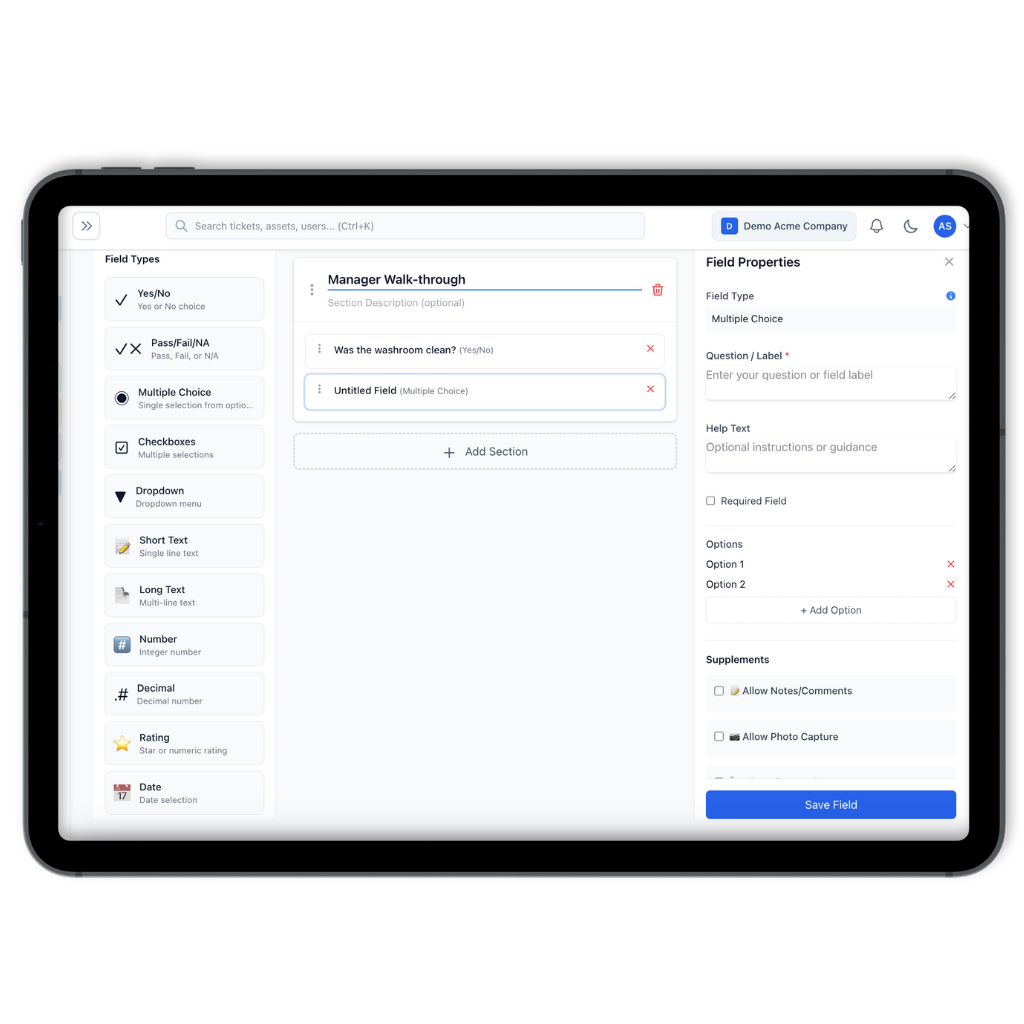
Create templates that scale

Build inspection templates for — daily ops, safety, cleaning, equipment checks, and quality audits.

Includes:
• Sections, questions, pass/fail, and notes
• Categories to help reporting and tracking
• Reusable templates across sites & teams

Run inspections on any device

Teams complete inspections quickly on-site — no paper, no chasing, no re-typing, no hassle.

Includes:
• Simple experience for fast completion
• Evidence capture (photos, notes etc.)
• Consistancy across teams and locations

Schedule recurring checks

Set your inspections to run daily, weekly, or monthly—by site and role — so nothing gets missed.

Includes:
• Recurring schedules by location
• Due dates and reminders
• Visibility into checks' status

How it works (3 steps)

Create your checklist template

Build your inspection once and reuse it across locations.

Schedule and complete inspections

Assign checks by site/role and complete them on mobile or web with evidence.

Track failures to closure

Raise follow-ups, assign owners, and confirm resolution with a full audit trail.

Why Margin Resolve

Replace paper checklists and disconnected tools

Paper and spreadsheets create gaps: checks get done inconsistently, evidence is missing, and follow-ups are tracked elsewhere.

Margin Resolve gives you:
• consistent completion across sites
• evidence captured at the point of work
• clear ownership and history for follow-ups
• reporting that updates in real time

FAQ

Can we start with inspections only?

Yes. Many teams start with Inspections & Checklists and add Maintenance, Incidents, or IT Helpdesk later.

Yes. You can deploy the same template across locations for consistency, while keeping results organised per site.

Yes. Teams can add photos and notes during the inspection to create clear evidence and context.

Failed items can trigger follow-up actions and can be raised into the appropriate workflow (maintenance work order, incident report, or IT ticket), depending on how you run operations.

Yes. You can export reports for audits, management updates, and compliance reviews.

Ready to standardise inspections across every site?

This website uses cookies to improve your web experience.